B

Big Rig Butler

Truck routing without the runaround

View pricing
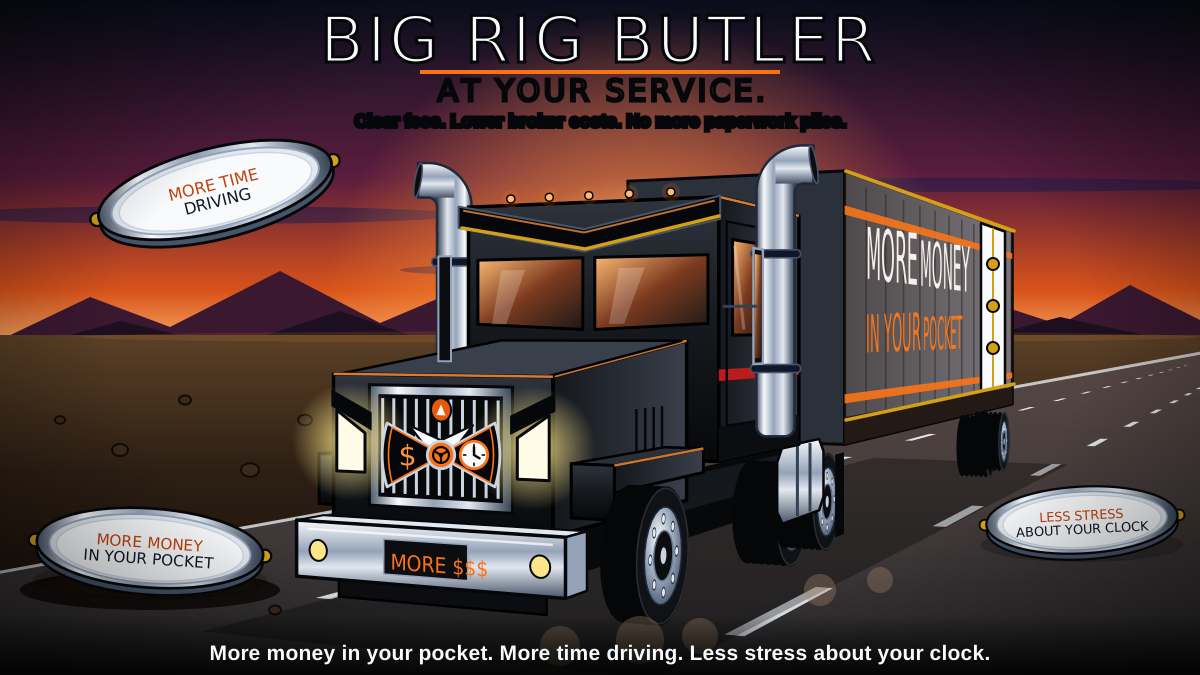
Big Rig Butler. A black semi truck dressed like a butler, with a tuxedo bow tie and a white shirt front on its trailer, charges toward you. Three silver serving platters carry the promises: More money in your pocket, More time driving, and Less stress about your clock. The headline reads, "Big Rig Butler. At your service."

Built by a working trucker, for truck drivers

More time driving. More of the money you earn. Less stress about the clock.

Truck-aware routing, bill of lading scanning and a load board that shows every fee, in one affordable app for owner-operators.

Pricing To be announced Plans and prices will be announced at launch
  • Truck-aware route planning
  • Bill of lading scanning
  • Truck broker load board
📍

Truck-aware routes

Routes planned around your truck's height, weight and hazmat class, with delivery location photos and notes from other drivers.

🛰️

Driver-reported road info

Parking reports, dock ratings and hazard reports from drivers on the road, free for every account.

🛡️

Paperwork done for you

Scan a bill of lading with your phone, keep a fuel log for IFTA, and track your hours of service.

What you get

The tools drivers expect, all in one place.

  • Truck-aware routing for your height, weight, length and hazmat class (rolling out)
  • Toll road avoidance, state by state
  • Voice guidance
  • Saved places
  • Choose which fuel stops and repair or tire shops you want to see
  • Fuel log with miles by state for fuel tax (IFTA)
  • Reports from drivers: low bridges, closed roads, construction, accidents and traffic
  • Parking reports from drivers
  • Big text, light and dark mode, portrait or landscape

Coming soon

  • Bill of lading scanning
  • Hours of service tracking
  • A load board
  • More features, to be announced

A first look

What the app is being built to do.

Please note: these pictures are concepts. They show the idea, not the finished app, and they are subject to change before launch. The places, times and numbers in them are made up.
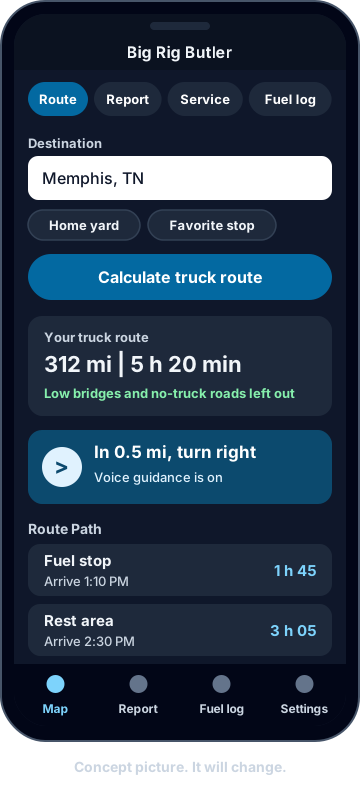
Concept picture of the Route screen. A destination box, a button to calculate a truck route, a summary showing 312 miles and 5 hours 20 minutes, the next turn with voice guidance, and a list of stops with arrival times.

Truck routes, turn by turn

Type where you are going and get a route built for a truck, not a car. The app leaves out low bridges and roads that do not allow trucks, speaks the next turn out loud, and shows when you will reach each stop.
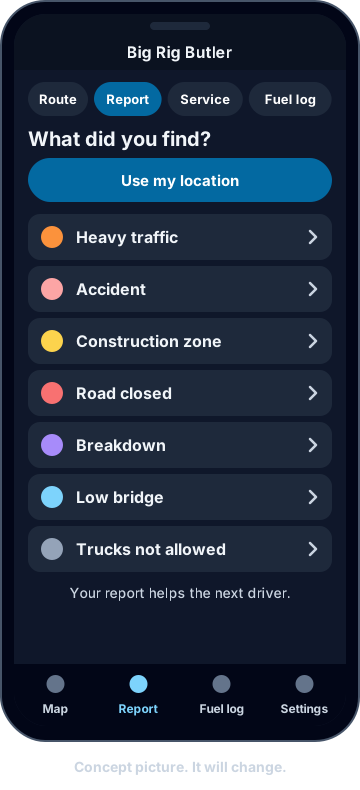
Concept picture of the Report screen. A list of road problems to report: heavy traffic, accident, construction zone, road closed, breakdown, low bridge and trucks not allowed.

Reports from drivers

Saw a closed road, a low bridge or a wreck? Tap it in and the next driver knows before they get there. You can use your phone's location so you do not have to type where you are.
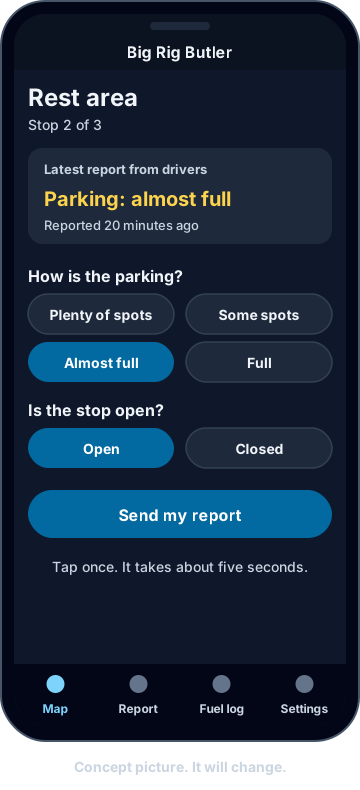
Concept picture of a rest area check-in. The latest driver report says parking is almost full, with buttons to say how full the parking is and whether the stop is open.

Parking reports

Before you pull in, see what the last driver there said about parking. When you get there, tell the next driver with one tap.
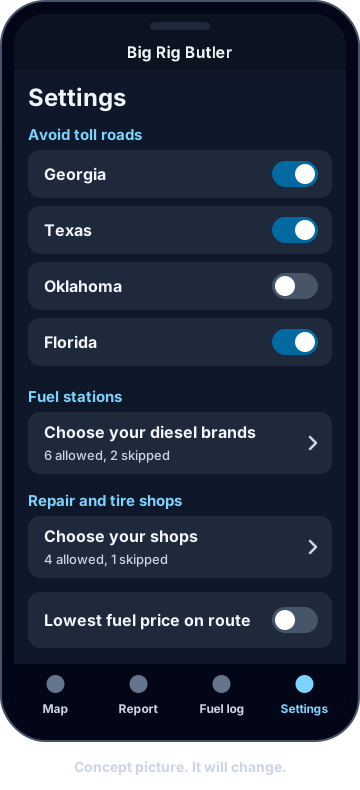
Concept picture of Settings. Switches to avoid toll roads state by state, and lists for choosing which diesel brands and which repair and tire shops to see.

Your choices, your way

Avoid toll roads one state at a time. Pick the fuel stops and the repair and tire shops you actually use, and skip the rest.
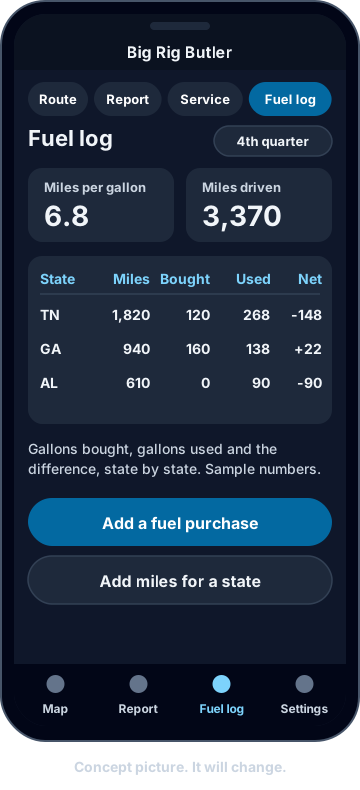
Concept picture of the Fuel log. Miles per gallon, miles driven, and a table of miles, gallons bought, gallons used and the difference for each state.

Fuel log for fuel tax

Keep your fuel purchases and your miles in each state in one place. The app works out your miles per gallon and the gallons bought and used in every state, so your fuel tax report (IFTA) is not a pile of receipts.
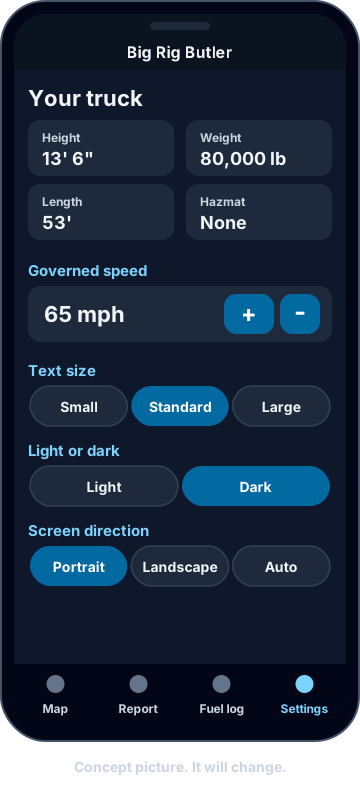
Concept picture of Settings. Your truck's height, weight, length and hazmat class, governed speed with plus and minus buttons, text size, light or dark mode and screen direction.

Made to fit your truck and your eyes

Enter your truck's size and weight once. Choose big text, light or dark mode, and portrait or landscape, so the screen is easy to read in the cab, day or night.

Concept pictures only. Screens, words and features may change before launch.

Our mission

More money in your pocket. More time driving. Less stress about your clock.

I spent decades in IT support before I became a truck driver. Now I can see what the people who built other trucking apps never saw from behind a desk. I am building the app I wish I had out on the road.

1

More cash for drivers

Too many middlemen take a bite out of every load. Here, every fee is shown up front and the market rate is on the screen, so you can see where every dollar goes.

2

More time driving

You should never have to type the same thing twice. Scan your paperwork with your phone, and the app fills in the rest.

3

Less stress about your clock

The app watches your hours and tells you early where you stand, so you are not doing math in your head at the end of a long day.

Pricing

Plans and prices to be announced at launch.

What you can count on

  • Truck-aware route planning (rolling out)
  • Road hazard reports from drivers on the road
  • Bill of lading scanning
  • A load board with every fee shown up front

Sign-up opens when the app launches. Join the waitlist to hear first.

Be first in line

Join the waitlist

Leave your email and we will write when sign-up opens. Early supporters hear about launch pricing first.

We use your email only to tell you about the app launch and early pricing, and we never sell it. You can ask to be removed at any time. Read our privacy policy.